'%3e%3cg%20transform='translate(342.7,42.0)%20scale(0.5023)'%3e%3cg%20fill='%23F4EFE6'%3e%3cg%20transform='translate(0,1087.0)%20scale(1,-1)'%3e%3cpath%20d='M0.0%200.0L116.0%200.0L116.0%20700.0L0.0%20700.0Z%20M610.0%200.0L726.0%200.0L726.0%20700.0L610.0%20700.0Z%20M220.1%20294.0L336.1%20294.0L116.0%20700.0L0.0%20700.0Z%20M220.1%20294.0L336.1%20294.0L726.0%20700.0L610.0%20700.0Z'/%3e%3c/g%3e%3c/g%3e%3cg%20fill='%23D7683D'%3e%3cg%20transform='translate(0,1087.0)%20scale(1,-1)'%3e%3crect%20x='222.0'%20y='805.0'%20width='118.0'%20height='118.0'/%3e%3crect%20x='386.0'%20y='805.0'%20width='118.0'%20height='118.0'/%3e%3crect%20x='304.0'%20y='969.0'%20width='118.0'%20height='118.0'/%3e%3c/g%3e%3c/g%3e%3c/g%3e%3c/g%3e%3c/svg%3e)
'%3e%3crect%20width='910'%20height='910'%20rx='218.4'%20fill='%23111315'/%3e%3cg%20transform='translate(-70,140)'%3e%3cg%20transform='translate(342.7,42.0)%20scale(0.5023)'%3e%3cg%20fill='%23F4EFE6'%3e%3cg%20transform='translate(0,1087.0)%20scale(1,-1)'%3e%3cpath%20d='M0.0%200.0L116.0%200.0L116.0%20700.0L0.0%20700.0Z%20M610.0%200.0L726.0%200.0L726.0%20700.0L610.0%20700.0Z%20M220.1%20294.0L336.1%20294.0L116.0%20700.0L0.0%20700.0Z%20M220.1%20294.0L336.1%20294.0L726.0%20700.0L610.0%20700.0Z'/%3e%3c/g%3e%3c/g%3e%3cg%20fill='%23D7683D'%3e%3cg%20transform='translate(0,1087.0)%20scale(1,-1)'%3e%3crect%20x='222.0'%20y='805.0'%20width='118.0'%20height='118.0'/%3e%3crect%20x='386.0'%20y='805.0'%20width='118.0'%20height='118.0'/%3e%3crect%20x='304.0'%20y='969.0'%20width='118.0'%20height='118.0'/%3e%3c/g%3e%3c/g%3e%3c/g%3e%3c/g%3e%3c/g%3e%3cg%20transform='translate(1030,175.0)%20scale(0.8)'%20fill='%23111315'%3e%3cg%20transform='translate(0,700)%20scale(1,-1)'%3e%3cpath%20d='M0.0%200.0L116.0%200.0L116.0%20700.0L0.0%20700.0Z%20M610.0%200.0L726.0%200.0L726.0%20700.0L610.0%20700.0Z%20M220.1%20294.0L336.1%20294.0L116.0%20700.0L0.0%20700.0Z%20M220.1%20294.0L336.1%20294.0L726.0%20700.0L610.0%20700.0Z'/%3e%3cpath%20transform='translate(796.0,0)'%20d='M0.0%200.0L116.0%200.0L116.0%20700.0L0.0%20700.0Z'/%3e%3cpath%20transform='translate(968.0,0)'%20d='M0.0%20584.0L566.0%20584.0L566.0%20700.0L0.0%20700.0Z%20M225.0%200.0L341.0%200.0L341.0%20700.0L225.0%20700.0Z'/%3e%3cpath%20transform='translate(1584.0,0)'%20d='M0.0%200.0L116.0%200.0L116.0%20700.0L0.0%20700.0Z%20M494.0%200.0L610.0%200.0L610.0%20700.0L494.0%20700.0Z%20M0.0%20302.5L610.0%20302.5L610.0%20418.5L0.0%20418.5Z'/%3e%3cpath%20transform='translate(2276.0,0)'%20d='M0.0%200.0L116.0%200.0L116.0%20700.0L0.0%20700.0Z%20M0.0%200.0L506.0%200.0L506.0%20116.0L0.0%20116.0Z'/%3e%3cpath%20transform='translate(2790.0,0)'%20d='M0.0%200.0L116.0%200.0L403.0%20700.0L287.0%20700.0Z%20M574.0%200.0L690.0%200.0L403.0%20700.0L287.0%20700.0Z%20M73.2%20178.5L616.8%20178.5L569.3%20294.5L120.7%20294.5Z'/%3e%3cpath%20transform='translate(3512.0,0)'%20d='M0.0%200.0L116.0%200.0L116.0%20700.0L0.0%20700.0Z%20M0.0%20167.2L628.0%20554.4L628.0%20700.0L0.0%20312.8Z%20M0.0%20298.8L628.0%200.0L564.2%20135.8L0.0%20434.6Z'/%3e%3c/g%3e%3c/g%3e%3crect%20x='4462.0'%20y='154.0'%20width='3'%20height='602'%20fill='%23111315'%20opacity='0.28'/%3e%3cg%20transform='translate(4585.0,150.2)%20scale(0.8)'%20color='%23111315'%3e%3cg%20transform='translate(-41,740)'%3e%3cg%20fill='currentColor'%3e%3cpath%20d='M427%2012Q319%2012%20245.5%200.5Q172%20-11%20126.5%20-37.5Q81%20-64%2061.0%20-107.0Q41%20-150%2041%20-212Q41%20-252%2051.5%20-298.5Q62%20-345%2082%20-393L168%20-368Q150%20-331%20140.0%20-298.0Q130%20-265%20130%20-239Q130%20-209%20142.5%20-188.0Q155%20-167%20183.0%20-154.0Q211%20-141%20255.5%20-135.0Q300%20-129%20364%20-129H504Q572%20-129%20616.5%20-132.5Q661%20-136%20687.0%20-144.5Q713%20-153%20723.0%20-168.0Q733%20-183%20733%20-206V-740H839V-206Q839%20-131%20921%20-131H952V-27L925%200Q847%200%20802.5%20-30.0Q758%20-60%20744%20-125H739Q731%20-86%20712.0%20-60.0Q693%20-34%20656.5%20-18.0Q620%20-2%20564.0%205.0Q508%2012%20427%2012ZM340%20-301%20493%20-374%20491%20-380H416Q381%20-380%20362.0%20-395.0Q343%20-410%20343%20-448Q343%20-479%20363.5%20-500.5Q384%20-522%20427%20-547L491%20-585L525%20-528L406%20-460L408%20-453H485Q519%20-453%20537.0%20-439.0Q555%20-425%20555%20-393Q555%20-358%20537.5%20-337.0Q520%20-316%20478%20-295L371%20-241Z'/%3e%3cpath%20d='M925%20-104%20952%20-131H980Q1022%20-131%201041.5%20-149.5Q1061%20-168%201061%20-206V-740H1168V-206Q1168%20-131%201242%20-131H1277V-27L1250%200Q1172%200%201129.5%20-30.0Q1087%20-60%201073%20-124H1067Q1055%20-58%201022.0%20-29.0Q989%200%20925%200Z'/%3e%3cpath%20d='M1250%20-104%201277%20-131H1308Q1390%20-131%201390%20-206V-353H1488V-206Q1488%20-131%201563%20-131H1601V-27L1574%200Q1497%200%201456.0%20-30.0Q1415%20-60%201401%20-124H1396Q1383%20-58%201349.5%20-29.0Q1316%200%201250%200Z'/%3e%3cpath%20d='M1717%20-57Q1694%20-25%201661.0%20-12.5Q1628%200%201574%200V-104L1601%20-131Q1639%20-131%201656.0%20-145.0Q1673%20-159%201686%20-193L1714%20-263Q1726%20-294%201742.0%20-321.0Q1758%20-348%201779.0%20-367.5Q1800%20-387%201827.0%20-398.0Q1854%20-409%201889%20-409Q1976%20-409%202022.0%20-337.0Q2068%20-265%202068%20-138V-103L1984%2022ZM1767%20-178%201973%20-117V-138Q1973%20-204%201944.5%20-240.5Q1916%20-277%201868%20-277Q1833%20-277%201811.0%20-258.0Q1789%20-239%201776%20-203Z'/%3e%3c/g%3e%3cg%20fill='%23D7683D'%3e%3crect%20x='1447.0'%20y='-573.5'%20width='134.0'%20height='134.0'/%3e%3crect%20x='1297.5'%20y='-573.5'%20width='134.0'%20height='134.0'/%3e%3crect%20x='1372.5'%20y='-711.5'%20width='134.0'%20height='134.0'/%3e%3c/g%3e%3c/g%3e%3c/g%3e%3c/svg%3e)
Service catalogue
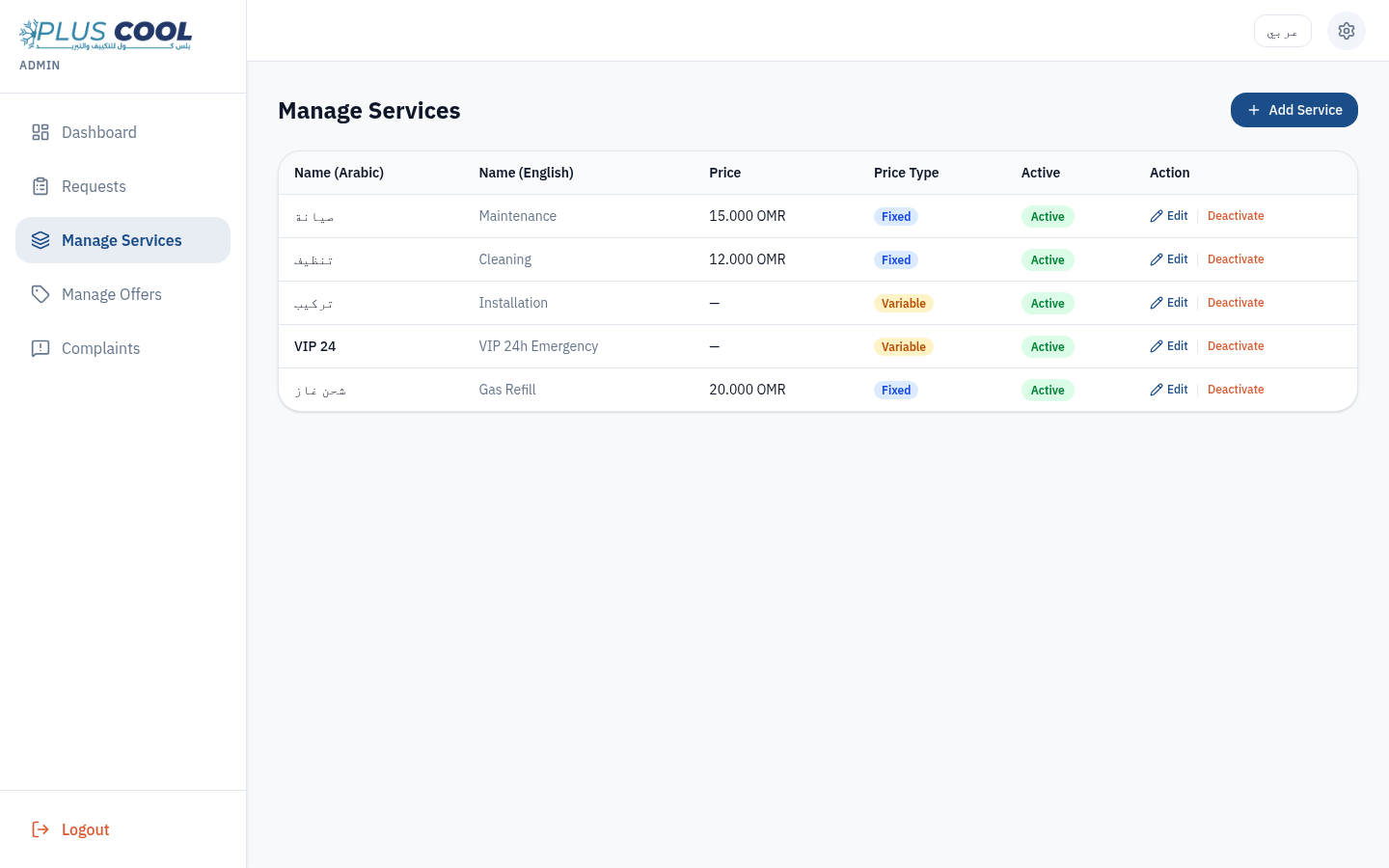
Bilingual service names, fixed or variable pricing, urgent flag, display order and an active toggle.
CASE STUDY
Web App · Field Service · Bilingual AR / EN
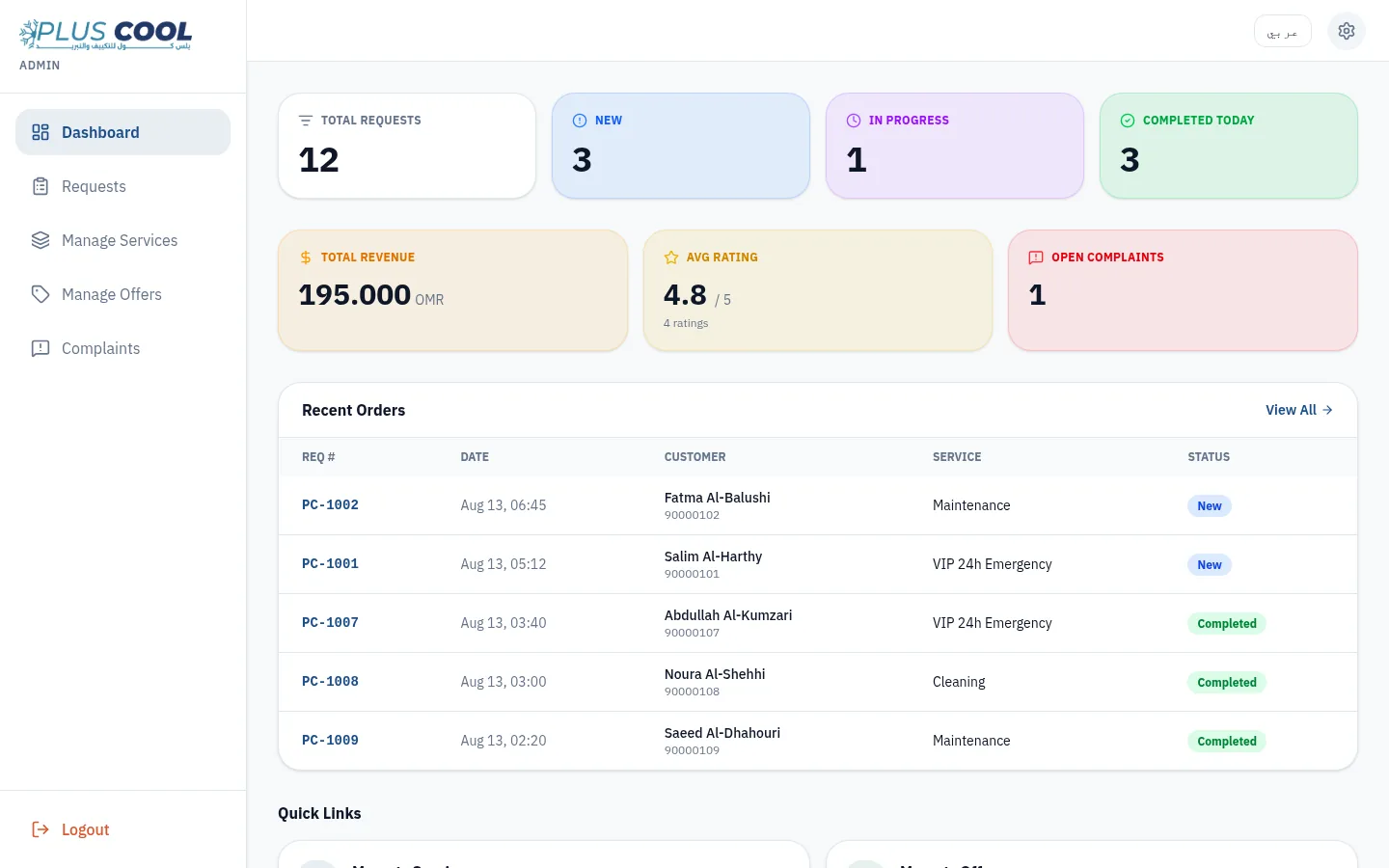
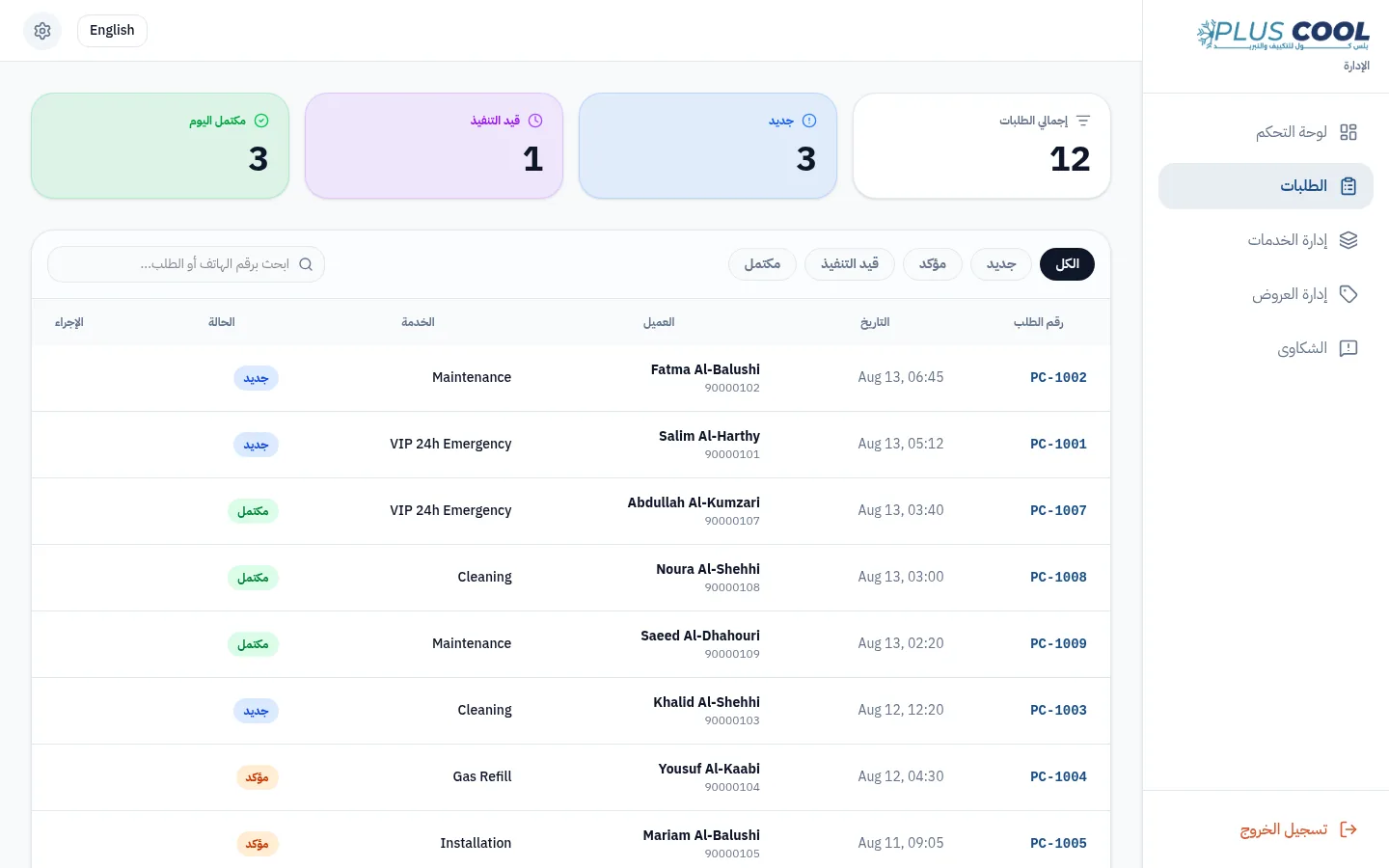
Plus Cool is a bilingual Arabic/English Web App for an air-conditioning service company in Khasab, Oman. A customer picks a service and submits a request with a location, and the request enters an office queue where staff assign a technician, record quoted and final prices, add internal notes, and move the job through New, Confirmed, In Progress and Completed. Services, offers, ratings and complaints are managed in the same place.
The system gives customers a dedicated way to check request status while giving office staff one operational view of the request and its related information.
Draft — not published
THE OPERATIONAL PROBLEM
An HVAC service business runs on incoming requests. Until someone acts on it, a request exists only as a call, a message or a note — so the status of a job, the technician responsible, the quoted price and the next required action are held in different places.
Plus Cool structures the same workflow instead of replacing it: one record per request, one queue for the office, and one place where the service catalogue, offers, ratings and complaints are managed.
CORE WORKFLOW
Service selected and request submitted with location
System state
Request number issued (PC-XXXX)
System state
Request enters the office queue as New
System state
Technician assigned and price quoted
Human decision
Status moved to In Progress, notes recorded
Human decision
Final price recorded, job completed, follow-up or complaint
Human decision
Every price and every status change is a human decision — there is no automated dispatch and no AI in this system. The office-side workflow shown here was exercised against demonstration data.
PRODUCT PROOF
One queue instead of scattered messages.
REQUEST DETAIL
THE PRODUCT
BILINGUAL BY DESIGN
KEY MODULES
Bilingual service names, fixed or variable pricing, urgent flag, display order and an active toggle.
A structured bilingual form capturing customer, service, issue and an optional location pin, issuing a PC-XXXX request number.
Status filters, phone or request-number search, and a single work panel per request.
Technician name, quoted price and final price recorded on the same record, with internal notes.
Customers look up a request by phone number — no account and no app to install.
CMP-XXXX complaint records with review states and a written response, percentage or fixed offers with validity dates, and 1–5 star ratings on completed jobs.
FOR HVAC & FIELD SERVICE BUSINESSES
For a small number of easily managed jobs, simple tools may be enough.
A custom system becomes more useful when request information is distributed across calls, WhatsApp, spreadsheets, and staff memory, or when it becomes difficult to see each request's status, assigned technician, quoted price, and next required action.
The goal is not simply to add a dashboard. It is to create a clear workflow from service request to completion.
Discuss your service workflowCURRENT SCOPE
What this version covers
The current version focuses on service-request intake and office-side request management, including technician assignment, pricing, status tracking, and complaints.
What it does not include
Office staff use shared access, and this version does not include individual technician accounts, live GPS tracking, or payment processing. Location is captured once at request time.
Future systems can be scoped differently according to team size, workflow, and business requirements.
TECHNICAL FOUNDATION
A bilingual Web App built around one request record and a status-driven office workflow, with an RTL-aware interface across both the customer screens and the administration dashboard.
DEFINITION
HVAC service management software is an operational system used to structure customer service requests, job status, technician assignment, and follow-up inside a visible workflow. The required modules vary according to the company's process, team size, and service model.
FAQ
The short version
RELATED SERVICE
START
MITHLAK maps how requests actually arrive and get closed, then builds the system around that workflow — bilingual where that matters, and simple enough that the team uses it.
Start your project